Blog Post Details Page

08:15 AM | October 19, 2026 3 Views
How Can Patients Organise Their Liver Health Records Digitally?
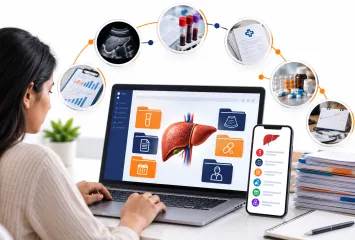
Managing a chronic liver condition can involve regular blood tests, ultrasound reports, prescriptions, specialist appointments and ongoing monitoring. When these documents are spread across email accounts, hospital portals, paper folders and mobile phones, finding the right information can become difficult.
Learning how to organise liver health records digitally can make it easier to retrieve documents, review historical results and prepare for medical appointments. A well-organised system does not need to be complicated or expensive. It simply needs to keep information accessible, clearly labelled and secure.
This guide explains how patients and caregivers can create a practical digital filing system, monitor liver-related results, protect sensitive information and use digital tools responsibly.
How Can Patients Organise Liver Health Records Digitally?
Patients can organise liver health records digitally by storing laboratory reports, prescriptions, imaging results, discharge summaries and appointment notes in clearly labelled folders. Using consistent file names, recording test dates, maintaining a medication list and keeping secure backups can make information easier to retrieve and share with healthcare professionals.
What Are Digital Liver Health Records?
Definition
Digital liver health records are electronic copies or summaries of information related to a person's liver health. They may include blood test results, imaging reports, diagnoses, prescribed medicines, symptoms and clinical notes.
Patients can maintain these records using a secure patient portal, a suitable health-record application, encrypted storage or an organised collection of digital files.
The US Office of the National Coordinator for Health Information Technology explains that secure health apps can help people access, organise and share health information. In India, the Ayushman Bharat Digital Mission also supports personal health records that individuals can manage and share through appropriate consent.
Why Does Digital Organisation Matter?
An organised record system can help patients locate previous results, remember questions for their next appointment and provide relevant history when consulting a new specialist.
It is particularly useful when several healthcare providers are involved in ongoing care. However, patient-maintained records should supplement—not replace—the official records held by hospitals, laboratories and clinicians.
Which Liver Health Records Should Patients Store?
Start with the documents that are most relevant to your current care.
Laboratory reports: Keep dated results for bilirubin, albumin, liver enzymes, INR, platelet count, kidney function and other tests requested by your clinician.
Imaging reports: Store ultrasound, CT, MRI and liver stiffness assessment reports, together with their dates.
Medical summaries: Keep copies of diagnoses, hospital discharge summaries, specialist letters and procedure reports.
Medication information: Record prescribed medicines, doses, changes and known allergies. Verify the current list with your healthcare professional.
Symptoms and appointments: Note relevant symptom changes, appointment dates and questions to discuss with your care team.
Liver-related scores: If your clinician uses MELD 3.0 or another assessment, retain the dated score and the information used to interpret it.
How to Create a Simple Digital Filing System
1. Choose One Main Location
Select a secure primary location for your files, such as a trusted patient portal, a health-record application or protected digital storage. Avoid scattering documents across multiple email accounts and messaging conversations.
Create a main folder called Liver Health Records, with subfolders such as:
Blood Tests
Imaging and Scans
Prescriptions and Medicines
Specialist and Hospital Reports
Symptoms and Appointments
The goal is to find a report quickly without remembering which device or conversation contains it.
2. Use Consistent File Names
A clear naming system can make a large collection of reports easier to manage.
For example, name a report:
2026-09-18_Liver-Function-Test_Laboratory.pdf
Include the date, document type and source when helpful. Use the date shown on the report, not the date you downloaded it. Keep the original file whenever possible so the laboratory values, reference ranges and reporting details remain available.
3. Maintain a Simple Health Timeline
A timeline can show when tests were performed, when medicines changed and when appointments occurred.
For example:
Date
Record
Action
12 August 2026
Blood test report
Saved to laboratory folder
26 August 2026
Specialist appointment
Questions and notes recorded
10 September 2026
Imaging report
Saved with previous scans
This is an organisational example, not a clinical interpretation. A timeline helps establish when information was recorded; a clinician must interpret what changes mean medically.
4. Keep Important Information Easy to Find
Create a short summary containing your main diagnoses, current medicines, allergies, treating clinicians and emergency contact details. Update it whenever relevant information changes.
Keep full reports separately. A summary is useful for quick reference, but it should not replace original results or medical advice.
How Can Patients Monitor Liver Test Results Over Time?
Recording a result is only one part of monitoring. Understanding its context is equally important.
Save each report with its collection date.
Record units and laboratory reference ranges when comparing results.
Use graphs only when the measurements and units are genuinely comparable.
Note relevant changes in medication or health status for discussion with your clinician.
Avoid drawing conclusions from one result without considering your full medical history.
Some tests measure different aspects of liver health, while others assess kidney function, blood clotting or other complications. A single measurement cannot provide a complete picture.
Digital tools such as the Liverlytics mobile application can help users organise liver health information, track MELD 3.0 and sodium values, review historical data and view trends across selected date ranges. Report generation and exportable records may also support preparation for consultations.
These are record-keeping and monitoring functions, not substitutes for medical interpretation. A calculated score or visual trend should not be used independently to change treatment.
How to Protect Digital Medical Records
Health records contain sensitive personal information, so privacy should be considered before choosing a storage method.
Review privacy policies: Understand what information an app collects, how it uses data and whether it shares information with third parties.
Use strong account security: Choose unique passwords, enable two-factor authentication where available and secure the device itself.
Control sharing: Share only the information needed for the intended purpose, and review who has access.
Maintain backups: Keep a protected backup of important records in case a device is lost or an account becomes inaccessible.
Be cautious with public devices: Avoid saving passwords on shared computers and sign out after accessing health portals.
Common Mistakes to Avoid
Saving reports without dates or meaningful file names.
Keeping the only copy of a report on one phone.
Treating an automatically calculated score as a medical diagnosis.
Sharing complete records through unsecured channels when only selected documents are needed.
Deleting older reports simply because a newer result is available.
Assuming that an app automatically contains every record held by a hospital or laboratory.
When Should You Speak to a Doctor?
Contact your healthcare professional if you have questions about changing results, new symptoms or which measurements need monitoring. Bring the relevant original reports rather than relying exclusively on a personal summary.
Seek emergency care for warning signs such as vomiting blood, black tarry stools or new confusion. Do not delay urgent assessment while trying to update or organise digital records.
Expert Insights: Make the System Work for Everyday Life
The best record-keeping system is one that you can maintain consistently. You do not need to digitise every historical document immediately.
Start with recent laboratory results, the current medication list and the latest specialist reports. Add older records as time allows, giving priority to documents that may influence current care.
For caregivers, agree on who will update the records and who is permitted to access them. Keep paper copies available when digital access is unreliable, particularly when travelling or attending unfamiliar healthcare facilities.
Liverlytics integration: For people managing long-term liver conditions, a dedicated tracking tool may provide a convenient way to organise relevant measurements and review historical trends. The Liverlytics mobile application can support record organisation and consultation preparation, while clinical decisions remain with the treating healthcare team.
People Also Ask
How do I keep all my medical records in one place?
Use a secure patient portal, suitable health-record app or protected digital folder. Organise documents by type and date, and maintain backups.
Can I store liver test results on my phone?
Yes, provided your device and chosen storage method are appropriately secured. Protect access with a strong passcode and avoid unnecessary sharing.
How should I track liver function tests over time?
Save dated reports, retain units and reference ranges, and discuss trends with your clinician. Results should be interpreted in their clinical context.
Are health-record apps safe?
Safety depends on the app's security practices, privacy policy, data-sharing arrangements and your account settings. Review these before storing sensitive records.
Can digital health records help during specialist appointments?
They can make relevant reports and medical history easier to retrieve, potentially helping patients prepare questions and provide information to clinicians.
Frequently Asked Questions
1. What is the easiest way to organise medical reports digitally?
Start with one main folder, create subfolders by document type and use consistent date-based file names. Add a simple index if you have many reports.
2. Should I keep old liver blood test results?
Generally, retain relevant historical reports unless your healthcare provider or record-retention requirements advise otherwise. Older results may help explain a longer-term pattern.
3. Can an app track my MELD 3.0 score?
Some tools, including Liverlytics,mobile app provide MELD 3.0 tracking or calculation features. Use accurate inputs and consult your healthcare team to interpret the score.
4. Can I share my digital medical records with another doctor?
You can share relevant records using a method accepted by the receiving provider. Check the recipient and sharing permissions before transmitting sensitive information.
5. What if my hospital already has an online patient portal?
Use it as a source for available official records, then check whether it covers all relevant providers and document types. Keep copies of important information when permitted.
6. Is a spreadsheet enough to track liver health?
A spreadsheet can organise dates and measurements, but it may not preserve full reports or provide secure access controls. Keep original documents and protect the spreadsheet appropriately.
7. How often should I update my records?
Add new reports and medication changes when they occur. Review the summary before appointments and whenever your healthcare team requests updated information.
8. Can caregivers manage records for a family member?
They may help with permission from the patient or through an appropriate authorised arrangement. Protect confidentiality and share only what is necessary.
Key Takeaways
Keep liver-related laboratory results, imaging reports, prescriptions and specialist notes in one organised system.
Use clear file names and dated records to simplify retrieval.
Maintain a timeline while preserving original reports.
Review privacy, account security and backup arrangements before choosing a digital storage method.
Use tracking applications to organise information, not to diagnose conditions or make treatment decisions.
Conclusion
Organising liver health records digitally can make ongoing care easier to navigate by keeping important reports, dates and medical information accessible. A simple filing system, consistent updates and sensible privacy measures are often enough to create a useful foundation. Digital tools such as Liverlytics mobile app can support the organisation and review of liver health information, while healthcare professionals remain responsible for interpreting results and guiding care.

“ Very little is needed to make a happy life. ”
— Marcus Aurelius
Let’s Get in Touch
Your email address will not be published. Required fields are marked *
Recent Post


Looking for a Smarter Way to Track Liver Health?
Try it stress-free — We never modify medical data without your confirmation.

Comments :
Ooops!
No comments found.